

WPAlist

Click here to download a .pdf file of these set-up instructions.
The Wisconsin Psychological Association (WPA) has partnered with the American Psychological Association Services, Inc. (APASI) to provide WPA members with the same type of listserv tool used at the national level. This will allow WPA members to communicate with one another via a group e-mail.
When using this great new collaboration tool, there are some critically important rules that must be observed.
Members are required to remain diligent with the APA rules and regulations of using their listserv service, and reference this link for detailed rules about posting. For more detail than is below, feel welcome to also make use of the information and tutorials provided by APA through this link.
Summary of Rules
DO NOT USE THE FORUM FOR ILLEGAL PURPOSES, including but not limited to defamation, violation of intellectual property lases, violation of antitrust or unfair competition laws or violation of criminal laws.
DO NOT INTENTIONALLY INTERFERE WITH OR DISRUPT OTHER FORUM MEMBERS, network services, or network equipment. This includes distribution of unsolicited advertisement or chain letters, propagation of computer worms and viruses, and use of the network to make unauthorized entry to any other machine accessible via the Forum.
DO NOT USE THE FORUM FOR COMMERCIAL PURPOSES. "Commercial" as used for purposes of evaluating listserv messages means communications whose primary purpose is to advance the business or financial interests of any person or entity, or otherwise to promote a financial transaction for the benefit of the author directly or indirectly. Examples of prohibited communications include advertisements for products or services, notices regarding rental of office space, or direct solicitations of listserv members to purchase products or services.
This is only a summary of rules, to make use of the WPAlist service, WPA Members are obligated to follow all the detailed APA listerve rules.
How To Begin
If you are a registered user of the APA Listserv already, then you can skip step #1. If you are not a registered user with the APA Listserv server there are two things to do:
-
Subscribe to the WPAlist and
-
Register to the APA Listserv service
To access the web portion of the APA Listserv server, visit this link.
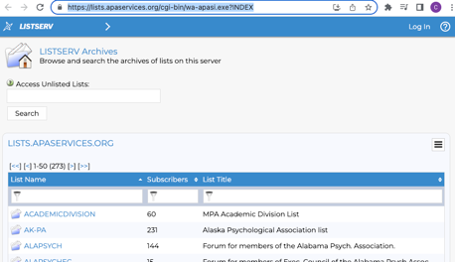
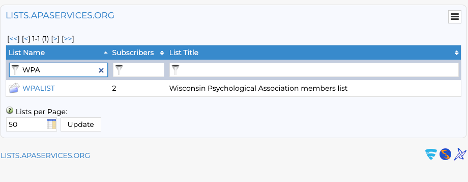
Then search “WPA” in the search feature, then click on the “WPALIST” that the search returns.
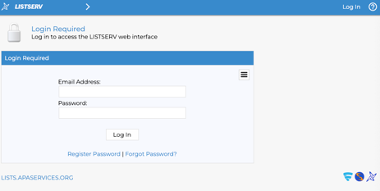
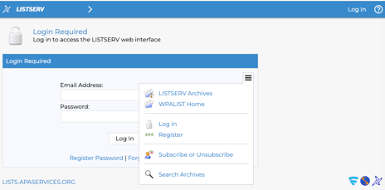
Click on the "hamburger menu" icon (three bars) on the right-hand side of the “Login Required” Screen and a menu will drop down.
You will then need to click on “Subscribe or Unsubscribe”
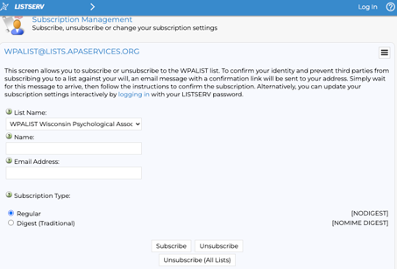
Once you’ve reached this screen, you will need to enter the appropriate information.
Please note: the email you enter at this screen should be the email you use to log in to the members-only portion of the WPA website. If you can’t remember, visit this link to and reset your password.
Once you have finished entering your information hit the “Subscribe” button.
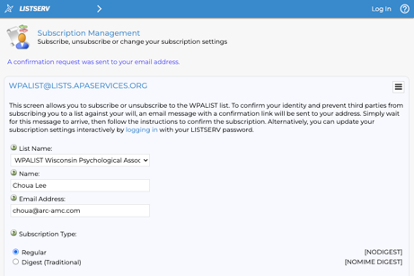
Once you hit the “Subscribe” Button you should have the following prompt at the top of the page “A confirmation request was sent to your email address”. Check your email for the confirmation email.
Please note: The e-mail may take between 5-10 minutes to arrive. If you do not see it in your in-box, check your junk and spam filters/folders.
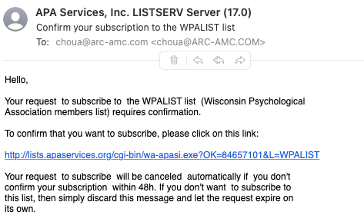
The e-mail will be titled as shown below from “APA Services, Inc. LISTSERV Server”. Be sure to click on the link provided to confirm your subscription.
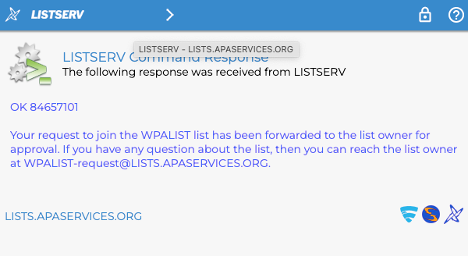
Your web browser should pop-up with the following screen. This will notify the WPA office that you are requesting access to the WPAlist listserv. If this is during business hours, the office will be approving your message promptly, but you are required to wait for the approval message to complete the registration process. If this is outside of 8:00 am – 5:00 pm Monday through Friday, please allow up to one business day for staff to review and approve your access to the list. Access to the list is not automatic, the process is intentionally set-up as a manual process approval to ensure that only current WPA Members have access to the list.
Once approved, you will receive two (2) separate emails from APA Services, Inc. Server, which are sent very closely together:
- “Welcome Email”
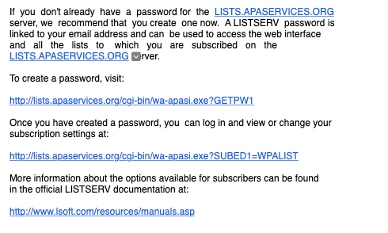
- “You have been added to the WPAlist” - in this email you need to create a password by clicking the link under “To create a password, visit”
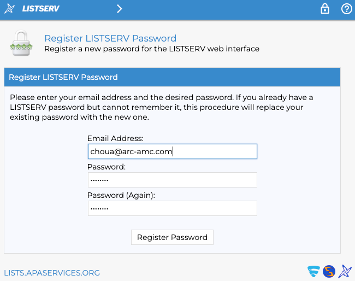
Enter your choice of a password twice and hit “Register Password”.
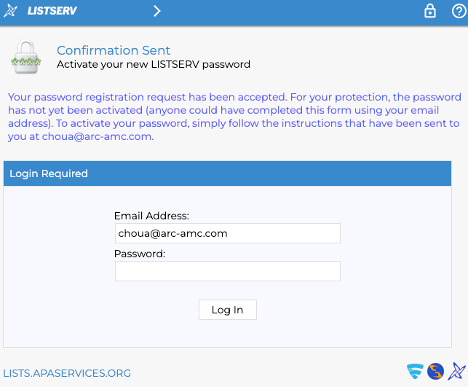
You will need to check your email again to confirm that your password was accepted. Remember, receiving the e-mail may take up to 10 minutes.
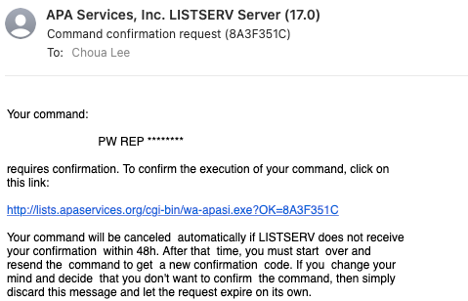
You should then receive the following email from APA Services, Inc. and will need to click the link provided in the email to confirm the acceptance of your password.
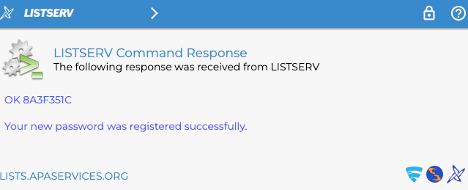
Upon clicking the link, you should have the following screen. This will confirm that you have successfully subscribed to the WPAlist AND registered to the APA Listserv Server.
That’s everything!
Using the Listserv
Once you complete the set-up process, you can then begin using the WPAlist listserv.
To open a conversation, launch your e-mail program and create a new e-mail with this address in the "To:" line: [email protected].
Remember, when using this listserv, WPA Members are required to remain respectful and diligent of the APA rules and regulations regarding use of their listserv service. Please keep this link handy to reference those rules when posting, and if you need more detail and information, please review the information and tutorials found through this link.
Click here to download a .pdf file of these set-up instructions.
